
Statistics Overview#
While histograms provide a useful means of visualising vectorial and axial data in 3D, statistical tools provide quantitative insights into the data.
As we discussed in Introduction to Vectors, vectors have a magnitude and a direction or orientation.
The magnitude is simply a scalar value and can be analysed using usual approaches and existing statistics packages. You are likely familiar with Euclidean statistics.
Attention
In some cases, special care should be taken when analysing the vector magnitudes to ensure that the approaches used produce results that can be interpreted. Just because you can perform an operation numerically does not guarantee that the result is valid conceptually.
The direction is a more complicated quantity. For example, let’s say we want to find the average direction between a unit vector with \((\phi_1, \theta_1) = (90, 358)\) and one with \((\phi_2, \theta_2) = (90, 2)\) (all angles in degrees). If we try to average the angles, we’ll get:
So, the average direction would be \((\phi, \theta) = (90, 180)\), right? Wrong! Our supposed average vector is actually backwards! So, we can’t just do operations on the spherical coordinates. We need a different framework for doing statistics on the directions. The answer is directional statistics.
See also
Interested in learning about directional statistics in depth? Consult the textbooks by Fisher [1995], Fisher et al. [1993], Mardia and Jupp [2000]. These books provide much more detailed description of the tools and procedures discussed in this page.
Directional Statistics#
VectoRose provides a number of functions for computing directional statistics based on the descriptions by Fisher et al. [1993]. These tools perform gain insight into a collection of vectors by quantifying:
the dominant direction,
the shape of the distribution on the unit sphere,
the spread of the collection of vectors.
We’ll introduce and briefly explain the statistical routines and how to use them in VectoRose.
To demonstrate the statistics functionality, we’ll continue using our
sample vector dataset from two_clusters.npy. As usual, we’ll start by loading these vectors from
the bundled file using the load()
method of the object data.SampleData.TWO_CLUSTERS.
import vectorose as vr
import vectorose.data

my_vectors = vr.data.SampleData.TWO_CLUSTERS.load()
my_vectors = vr.util.remove_zero_vectors(my_vectors)

my_vectors
array([[ 0.01330902,  0.06486094, -0.08154041],
       [ 0.19911095,  0.06809676, -0.02230348],
       [ 0.14568445,  0.08995054,  0.06688315],
       ...,
       [-0.0377645 ,  0.35891606,  0.6731566 ],
       [-0.13033349,  0.56234415,  0.27104764],
       [-0.03287074,  0.60723468,  0.63249369]], shape=(200000, 3))
Now, we’re ready to start thinking about statistics. Like with histograms, we can compute directional statistics on the entire set of vectors, and thus study the marginal orientation distribution, or we can first select vectors based on their magnitudes and study the conditional orientation distribution.
Danger
To be able to interpret the results, we must pass in a collection of
unit vectors in Cartesian coordinates to the statistics routines from
the stats module. Otherwise, the underlying statistical theory will
likely not hold and the results will probably be invalid (no pun intended).
Extracting Unit Vectors#
In light of that last comment, you may be wondering how to get these unit vectors. There are a number of ways that we can do this, and this process depends on whether we are studying the marginal orientation distribution or a conditional orientation distribution.
To study the marginal orientation distribution, we can simply rescale all
vectors to unit vectors using util.normalise_vectors(). This
function returns the unit vectors pointing in the same direction as the
provided vectors, along with the magnitude of each vector.
my_unit_vectors , magnitudes = vr.util.normalise_vectors(my_vectors)

my_unit_vectors
array([[ 0.12670716,  0.61750174, -0.77629691],
       [ 0.94092313,  0.32179955, -0.10539784],
       [ 0.7925548 ,  0.4893503 ,  0.36385872],
       ...,
       [-0.04944308,  0.46990994,  0.88132856],
       [-0.20437472,  0.88180656,  0.42502725],
       [-0.03746302,  0.69206985,  0.72085772]], shape=(200000, 3))
To study conditional distributions, the same process can be performed after manually filtering vectors based on their magnitude values using NumPy indexing.
Alternatively, if we’ve constructed a sphere representation during the
histogram construction phase, we can take advantage of the
SphereBase.convert_vectors_to_cartesian_array() method. This method
takes in a set of labelled vectors in a pandas.DataFrame. We can
indicate whether to produce unit vectors by setting
create_unit_vectors=True. We can pass either the complete set
of labelled vectors or perform some filtering using the shell column in
the table of labelled vectors. Let’s create a FineTregenzaSphere
with 32 magnitude bins, as usual.
my_sphere = vr.tregenza_sphere.FineTregenzaSphere(number_of_shells=32)
labelled_vectors, magnitude_bins = my_sphere.assign_histogram_bins(
    my_vectors
)

labelled_vectors
| phi | theta | magnitude | shell | ring | bin | |
|---|---|---|---|---|---|---|
| 0 | 140.922763 | 11.595749 | 0.105038 | 2 | 41 | 3 |
| 1 | 96.050088 | 71.119103 | 0.211612 | 4 | 28 | 34 |
| 2 | 68.662637 | 58.307407 | 0.183816 | 3 | 20 | 26 |
| 3 | 108.637973 | 58.402654 | 0.283404 | 5 | 32 | 26 |
| 4 | 101.600750 | 38.565368 | 0.301634 | 6 | 30 | 18 |
| ... | ... | ... | ... | ... | ... | ... |
| 199995 | 70.754479 | 309.190779 | 0.922267 | 18 | 21 | 141 |
| 199996 | 35.055502 | 350.961121 | 0.900928 | 18 | 11 | 101 |
| 199997 | 28.196955 | 353.993542 | 0.763798 | 15 | 9 | 85 |
| 199998 | 64.847612 | 346.951053 | 0.637718 | 12 | 19 | 151 |
| 199999 | 43.874659 | 356.901498 | 0.877418 | 17 | 13 | 118 |
200000 rows × 6 columns
Let’s say we only want to study the vectors falling in magnitude bin 16. We can select all vectors in that shell and then extract them as unit vectors.
my_shell_16_vectors = labelled_vectors[labelled_vectors["shell"] == 16]
my_shell_16_unit_vectors = my_sphere.convert_vectors_to_cartesian_array(
    my_shell_16_vectors, create_unit_vectors=True
)

my_shell_16_unit_vectors
array([[-0.30801771,  0.67306433,  0.67239088],
       [ 0.37825821,  0.79271686,  0.47803839],
       [-0.06662398,  0.33996956,  0.93807353],
       ...,
       [-0.29290263,  0.75241   ,  0.58998918],
       [-0.07565367,  0.99034794, -0.11613558],
       [ 0.12402074,  0.92341607,  0.36321015]], shape=(8332, 3))
Now that we know how to get the unit vectors that we’ll pass to the statistics functions, let’s dive into the statistical routines available in VectoRose.
Correlation#
Well, we weren’t completely truthful when we said that every statistics function requires unit vectors. There is one exception. We can compute the correlation coefficient between the magnitude and the direction, following the description given in Section 8.2.4 of Fisher et al. [1993].
This coefficient can be used to assess the strength of the relationship between the magnitude scalar values and the directions. In addition to computing a correlation coefficient, Fisher et al. [1993] also presented a mean of performing a hypothesis test on the correlation coefficient. The alternate hypothesis that the magnitude is correlated with the direction is tested against the null hypothesis that these quantities are uncorrelated.
To clarify…
Under the alternate hypothesis, there is a relationship between the magnitude and the orientation, with different magnitudes present at specific orientations and certain orientations being present only at specific magnitude levels.
Under the null hypothesis, there is no visible relationship between the magnitude and the orientation. At each orientation, the distribution of magnitudes looks similar, and at each magnitude level the directional distributions look similar.
If the computed p-value is small enough, we can reject the null hypothesis.
Attention
As we work with large datasets, we have only implemented the large sample case, where more than 25 vectors are provided. We also have not implemented the jackknife method discussed by the authors due to our large sample size.
To compute the correlation coefficient and perform the hypothesis testing,
we can use the function compute_magnitude_orientation_correlation()
from the stats module.
correlation_coefficient, hypothesis_test = vr.stats.compute_magnitude_orientation_correlation(
    my_vectors
)

print(f"Computed correlation coefficient is {correlation_coefficient}.")
print(f"Computed p-value is {hypothesis_test.p_value}.")
print(f"Reject the null hypothesis at "
      f"{hypothesis_test.test_significance}: "
      f"{hypothesis_test.can_reject_null_hypothesis}."
)
Computed correlation coefficient is 0.48431758726050445.
Computed p-value is 0.0.
Reject the null hypothesis at 0.05: True.
This example shows that compute_magnitude_orientation_correlation()
returns two values: the correlation coefficient and a
HypothesisResult containing information about the hypothesis
test.
Distribution Shape#
We provide additional functions for assessing the shape of the distribution, as well as measures of central tendency. By shape, we mean the pattern of how the vectors appear on the surface of the unit sphere. This is similar to how we can look at a 1D histogram and say if the plot looks uniform (flat), unimodal (one peak) or has some other pattern. We’ll see some tests for distinguishing between specific patterns, as well as some parameters than can be used to understand the shape of the distribution.
Uniform vs. Unimodal Distribution#
A basic operation to start is to determine whether the data is randomly distributed across the sphere surface (uniform) or if there is a preferred dominant orientation (unimodal). The procedure is described by Fisher et al. [1993] in Section 5.3.1(i).
The process consists of a hypothesis test. The null hypothesis that the data are uniformly distributed is tested against the alternate hypothesis that the data are unimodally distributed.
The Eye of the Beholder
Always check your plot first! Only perform this test if it is reasonably possible that the data follow one of these two models. If the plot clearly shows neither of these forms, then this is not the test to use.
We can perform this test using the function
uniform_vs_unimodal_test() which takes the unit vectors and an
optional test significance level. It returns a HypothesisResult
which contains the test statistic and the computed p-value.
uniform_unimodal_result = vr.stats.uniform_vs_unimodal_test(my_unit_vectors)

print(f"Computed p-value is {uniform_unimodal_result.p_value}.")
print(f"Reject the null hypothesis at "
      f"{uniform_unimodal_result.test_significance}: "
      f"{uniform_unimodal_result.can_reject_null_hypothesis}."
)
Computed p-value is 0.0.
Reject the null hypothesis at 0.05: True.
Attention
If the data are unimodal, this function only tells use that the distribution is unimodal. It does not tell what that mode is.
Woodcock’s Fabric Parameters#
While the previous test can be used to determine whether a distribution is uniform or has a single mode, it has a couple of limitations:
It cannot identify any other types of distributions.
It does not provide any quantitative description of the distribution.
To the first point, there are several different types of distributions on the surface of the sphere. Data may be uniformly distributed, appearing at random spots all over the surface of the sphere. They may also follow a cluster, like in the unimodal case discussed above. Another common distribution form is a girdle, which follows a great circle around the sphere. A girdle looks like a belt wrapped around the sphere.
It would be quite helpful to be able to quantitatively distinguish between these types of distributions.
Good news! We can!
To identify these types of distributions, we can compute Woodcock’s fabric parameters, first presented by Woodcock [1977] and discussed in Section 3.4 of Fisher et al. [1993].
The first step is to compute the orientation matrix. Fisher et al. [1993], define the orientation matrix \(\mathbf{T}\) in Section 3.2.4 (equation 3.15) as
This 3-by-3 square matrix has three eigenvalues \(\tau_3 \geq \tau_2 \geq \tau_1\). Woodcock [1977] defined two parameters based on ratios and logarithms of these eigenvalues: the shape parameter (\(\gamma\)) and the strength parameter (\(\zeta\)). Using the notation from Fisher et al. [1993], these parameters are defined as:
The shape parameter \(\gamma\) indicates whether the data are arranged in a cluster around a single point (\(\gamma > 1\)) or a uni-axial girdle along a great circle of the sphere (\(0<\gamma<1\)). As the shape parameter approaches \(\gamma=1\), representing the girdle-cluster transition, the distribution has a shape between that of a cluster and a girdle, appearing as a stretched cluster [Fisher et al., 1993, Woodcock, 1977].
\(\gamma \ll 1\) |
\(\gamma \approx 1\) |
\(\gamma \gg 1\) |
|---|---|---|
Uni-axial girdle |
Girdle-cluster transition |
Cluster |
The strength parameter \(\zeta\) indicates the intensity or compactness of the shape. Diffuse data, such as a uniform distribution, produce smaller values of the strength parameter (\(\zeta\to0\)), while more compact girdles and clusters produce greater values of this strength parameter (\(\zeta \gg 0\)).
\(\zeta \to 0\) |
\(\zeta \gg 0\) |
|---|---|
Uniform |
Compact |
In VectoRose, the orientation matrix can be computed for a set of vectors
or axes using the function compute_orientation_matrix() in the
stats module, while its eigen-decomposition can be computed
directly using the function compute_orientation_matrix_eigs().
Woodcock’s shape and strength parameters can be computed by calling
compute_orientation_matrix_parameters() and passing in the
orientation matrix eigenvalues.
Here is the workflow for our sample dataset.
orientation_matrix_eigen = vr.stats.compute_orientation_matrix_eigs(
    my_unit_vectors
)

woodcock_params = vr.stats.compute_orientation_matrix_parameters(
    orientation_matrix_eigen.eigenvalues
)

print(f"The vectors have shape parameter gamma = {woodcock_params.shape_parameter}.")
print(f"The vectors have strength parameter zeta = {woodcock_params.strength_parameter}.")
The vectors have shape parameter gamma = 0.2870315577110325.
The vectors have strength parameter zeta = 1.3994897108047861.
Computing Woodcock’s shape and strength parameters for conditional distributions can help reveal changes in the distribution with magnitude level. The distribution may resemble a cluster at some magnitude values, while resembling a cluster at others. These features may be overlapping in the marginal distribution, but become more visible when the magnitude shells are separated from each other.
Dominant Orientation#
In the previous section, we discussed the shape of distributions. Let’s say we have a cluster. It could be quite insightful to compute where the cluster lies on the sphere. In this section, we’ll discuss methods to compute the dominant direction in a collection of unit vectors.
Mean Resultant Vector#
A mean direction can be obtained by computing the resultant vector, described by Fisher et al. [1993] in Section 3.2.1.
The resultant vector \(\mathbf{R}\) is computed as
A related vector with the same direction is the mean resultant vector, which is normalised by the number of vectors under consideration.
Its magnitude, known as the mean resultant length is
where \(\overline{R}_x, \overline{R}_y, \overline{R}_z\) refer to the respective \(x,y,z\) components of the mean resultant vector \(\overline{\mathbf{R}}\) [Fisher et al., 1993].
The mean resultant length provides a basic indication of how the data are distributed on the sphere:
A mean resultant length approaching one reflects vectors with a preferential co-alignment in a single dominant orientation.
A mean resultant length approaching zero can be produced by a variety of different arrangements.
This second case complicates matters; uniform, girdle and bipolar distributions can all produce a mean resultant length approaching zero. In all of these cases, each vector or axis may have an anti-parallel counterpart that cancels its contribution. So, in the case of a girdle or bipolar distribution, even though the distribution is not simply random noise, the vectors all cancel each other out.
The resultant and mean resultant vector can be computed using the function
compute_resultant_vector(). The parameter compute_mean_resultant
is used to determine whether the resultant or mean resultant vector is
computed.
Let’s compute the mean resultant vector for our dataset and study its magnitude.
mean_resultant_vector = vr.stats.compute_resultant_vector(
    my_unit_vectors, compute_mean_resultant=True
)

mean_direction, mean_resultant_length = vr.util.normalise_vectors(
    mean_resultant_vector
)

print(f"The mean direction is {mean_direction}.")
print(f"The mean resultant length is {mean_resultant_length}.")
The mean direction is [0.50719293 0.82838475 0.23776889].
The mean resultant length is [0.64156931].
We now have the mean direction, and we have a bit of insight into how the vectors are distributed.
Warning
If your data are axial (oriented) and not vectorial (directed), make sure
that all your vectors are defined in the upper hemisphere using
util.convert_vectors_to_axes(). Otherwise, you will get unexpected
results.
Due to the important differences between axial and vectorial data, it is also vital that you do not compare the values between these two types of data (unless you are absolutely sure that you should be). Otherwise, you’ll just be comparing apples to oranges.
Spherical Median Direction#
Although the mean resultant vector is simple to compute, Fisher et al. [1993] note that it does not necessarily provide the best insight into dominant orientations in the case of asymmetric data. To provide a more general indication of preferred orientation, they discuss the spherical median, first proposed by Fisher [1985].
The spherical median is the vector that minimises the arc-length distance to all other vectors in the dataset [Fisher, 1985, Fisher et al., 1993].
The function compute_median_direction() provides an implementation
of the spherical median, based on the description by Fisher et al. [1993] in Section 5.3.1 (ii).
median_direction = vr.stats.compute_median_direction(
    my_unit_vectors
)

median_direction
array([0.43587292, 0.84307809, 0.31501448])
We’ve now seen a couple of different ways of finding the average direction. Once again, applying these to different magnitude shells can reveal dominant orientations at each magnitude level.
Attention
VectoRose currently only finds single modes. We may implement more complicated functions in the future to deal with multimodal distributions.
Von Mises-Fisher Parametric Statistics#
The above statistical operations assume little about the shape of the directional distributions under consideration. But, what if we have an idea of the underlying orientation distribution?
One common model in directional statistics is the unimodal, rotationally-symmetric von Mises-Fisher distribution [Fisher et al., 1993]. This distribution is similar to the Gaussian (normal) distribution commonly used in statistics on scalar data.
The von Mises-Fisher distribution is a simple unimodal distribution, forming a cluster on the unit sphere [Fisher et al., 1993]. This distribution has tw parameters:
the mean direction \(\mu\),
the concentration \(\kappa\).
The mean direction \(\mu\) indicates where the single cluster is located on the surface of the sphere.
The concentration parameter \(\kappa\) is analogous to the inverse of the standard deviation of the Gaussian distribution; the higher the concentration parameter, the more the vectors are co-localised (or concentrated) to a single point.
VectoRose can estimate both parameters to fit a von Mises-Fisher to the provided vectors. VectoRose can compute the mean direction and concentration parameter, as well as a measurement of error in the mean direction estimate. Our implementations are based on descriptions presented by Fisher et al. [1993].
The mean direction is obtained from the mean resultant vector using the
function compute_mean_unit_direction(). This function returns a unit
vector in the same direction as the resultant vector.
The concentration parameter can be estimated by solving the following equation presented by Fisher et al. [1993] in Section 5.3.2(iv) and by Fisher [1985]:
estimate_concentration_parameter().
As the von Mises-Fisher distribution is included as a random variable in
SciPy [Virtanen et al., 2020] (see
scipy.stats.vonmises_fisher), there are existing tools that can be
used to fit this distribution. We have included a wrapper function
fit_fisher_vonmises_distribution() that calls the SciPy
implementation of the parameter estimation.
# Estimate parameters using custom implementation.
mean_direction = vr.stats.compute_mean_unit_direction(
    my_unit_vectors
)
concentration_parameter = vr.stats.estimate_concentration_parameter(
    my_unit_vectors
)

print(f"Estimted mean direction {mean_direction}.")
print(f"Estimted concentration parameter {concentration_parameter}.")

# Estimate parameters using SciPy.
vmf_params = vr.stats.fit_fisher_vonmises_distribution(my_unit_vectors)

print(f"Estimted mean direction {vmf_params.mu}.")
print(f"Estimted concentration parameter {vmf_params.kappa}.")
Estimted mean direction [0.50719293 0.82838475 0.23776889].
Estimted concentration parameter 2.724251027140389.
Estimted mean direction [0.50719293 0.82838475 0.23776889].
Estimted concentration parameter 2.724251027140384.
Error Estimation#
In addition to estimating the mean direction, Fisher et al. [1993] discuss an approach for approximating the error of this estimate using confidence cones.
A confidence cone centred around the mean direction estimate acts as the directional analogue to a confidence interval. Upon repeated sampling, the region of the sphere contained within the cone contains the true mean direction \((1 - \alpha) \times 100\%\) of the time, where \(\alpha\) is defined as the confidence level (typically \(\alpha=0.05\)).
This cone is defined by an arc length angle from the estimate. For a set of vectors, the equation defining the angular radius \(\beta\) of the confidence cone for confidence level \(\alpha\) can be calculated by:
For instance, \(\beta_{0.95}\) would represent the angular radius of the confidence cone containing the true population mean in \(95\%\) of sample sets taken.
To compute the confidence cone angular radius, VectoRose provides the
function compute_confidence_cone_radius().
confidence_cone_radius = vr.stats.compute_confidence_cone_radius(
    my_unit_vectors,
    concentration_parameter,
    confidence_level=0.01,
    use_degrees=True
)

print(f"The confidence code has a width of {confidence_cone_radius}\u00b0.")
The confidence code has a width of 0.2941037753161617°.
Using functions in the plotting module, we can also visualise the
confidence cone in 3D.
import matplotlib.pyplot as plt
ax = plt.axes(projection="3d")

confidence_cone_patches = vr.plotting.construct_confidence_cone(
    confidence_cone_radius,
    mean_orientation=mean_direction,
    two_sided_cone=False,
    use_degrees=True
)

sphere_vertices = vr.plotting.construct_uv_sphere_vertices()

ax = vr.plotting.produce_3d_confidence_cone_plot(
    ax,
    confidence_cone_patches,
    sphere_vertices
)
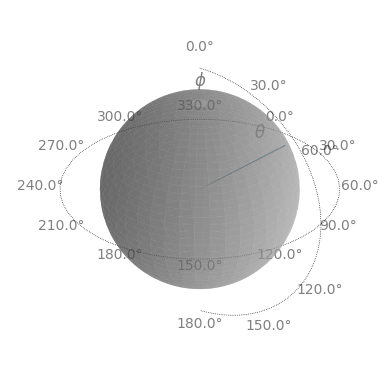
For more details about the plotting, see the documentation for
construct_confidence_cone() and
produce_3d_confidence_cone_plot().
Note
Due to the large size of many datasets, the confidence cone radius is likely to be quite narrow.
Danger
The von Mises-Fisher parameter estimates are only valid if two assumptions are met: the distribution must be unimodal and roughly symmetric about its mode. If these conditions are not met, the computed values should not be used, as the von Mises-Fisher distribution is not an appropriate model for the dataset under consideration.
Summary#
We’ve now seen the basic statistics functionality in VectoRose. These tests can be applied on any set of unit vectors. Applying each routine on various conditional distributions derived from a single set of vectors can reveal important insights about how the vectors orientation patterns change with vector magnitude.
Help Wanted!
Know of an approach for analysing directional data that you want to see implemented? Open an issue at bzrudski/vectorose#issues. Please share a reference describing the test and someone will hopefully try to implement it.
If you have an implementation, then great! Please add it to the
stats module and open a pull request!
In the next section, we’ll return to the world of 3D histogram plotting to see how to produce nice histogram animations that can be easily shared with the world.